IP Validation Rules
IP Validation Rules allow you to configure how IP address changes are handled during CAPTCHA verification. These rules help detect potentially fraudulent behavior by analyzing changes in the user’s IP address between requests.
Overview
Section titled OverviewIP validation checks compare the IP address used during CAPTCHA solving with the IP address used during verification. When differences are detected, you can configure specific actions to take based on the type of change detected.
Enabling IP Validation
Section titled Enabling IP ValidationTo enable IP validation checks, you must pass the user’s IP address when verifying the CAPTCHA response. See the Server-side Verification documentation for details on including the IP address in your verification request.
{ "secret": "your_secret_key", "token": "PROCAPTCHA-RESPONSE", "ip": "USER_IP_ADDRESS"}Without providing the IP address, IP validation rules will not be applied.
Validation Types
Section titled Validation TypesCountry Change Detection
Section titled Country Change DetectionDetects when the user’s country changes between solving the CAPTCHA and verification. This can indicate the use of VPNs, proxies, or other techniques to mask the true origin.
Use case: Block requests where the country changes between CAPTCHA solving and verification.
City Change Detection
Section titled City Change DetectionDetects when the user’s city changes between requests. More granular than country detection, this can identify suspicious behavior within the same country.
Use case: Flag or reject requests where users appear to rapidly change cities.
ISP Change Detection
Section titled ISP Change DetectionDetects when the Internet Service Provider changes between requests. Legitimate users typically remain on the same ISP during a session.
Use case: Identify potential bot networks or proxy usage by detecting ISP changes.
Distance Threshold
Section titled Distance ThresholdCalculates the geographic distance between IP addresses. If the distance exceeds your configured threshold, the action is triggered.
Use case: Reject requests where the IP location moves more than 1000km between requests, which is unlikely for a legitimate user in a short timeframe.
Actions
Section titled ActionsFor each validation type, you can configure one of three actions:
- Allow: Permit the request to proceed (no action taken)
- Reject: Block the request and fail verification
- Flag: Allow the request but mark it for review
Configuration
Section titled ConfigurationGlobal Rules
Section titled Global RulesGlobal IP validation rules apply to all requests unless overridden by country-specific rules.
{ actions: { countryChangeAction: "reject", // Block country changes cityChangeAction: "allow", // Allow city changes ispChangeAction: "flag", // Flag ISP changes distanceExceedAction: "reject", // Block distance violations }, distanceThresholdKm: 1000, // 1000km maximum distance requireAllConditions: false, // OR logic (any condition triggers action) forceConsistentIp: false // Don't require exact IP match}Logic Modes
Section titled Logic ModesAny Condition (OR Logic) - requireAllConditions: false
- Any single validation that triggers will cause the configured action
- More restrictive approach
- Default setting
All Conditions (AND Logic) - requireAllConditions: true
- All enabled validations must trigger before the action is taken
- More permissive approach
- Useful for reducing false positives
Country-Specific Overrides
Section titled Country-Specific OverridesYou can override global rules for specific countries using ISO 3166-1 alpha-2 country codes.
{ // Global rules actions: { countryChangeAction: "allow", cityChangeAction: "allow", ispChangeAction: "allow", distanceExceedAction: "reject", }, distanceThresholdKm: 1000, // Country overrides countryOverrides: { "US": { actions: { countryChangeAction: "reject", // Stricter for US ispChangeAction: "flag" }, distanceThresholdKm: 500 // Lower threshold for US }, "CN": { actions: { countryChangeAction: "allow", // More permissive for CN cityChangeAction: "allow" } } }}Country overrides only need to specify the fields you want to change. Unspecified fields will use the global defaults.
Configuration via Portal
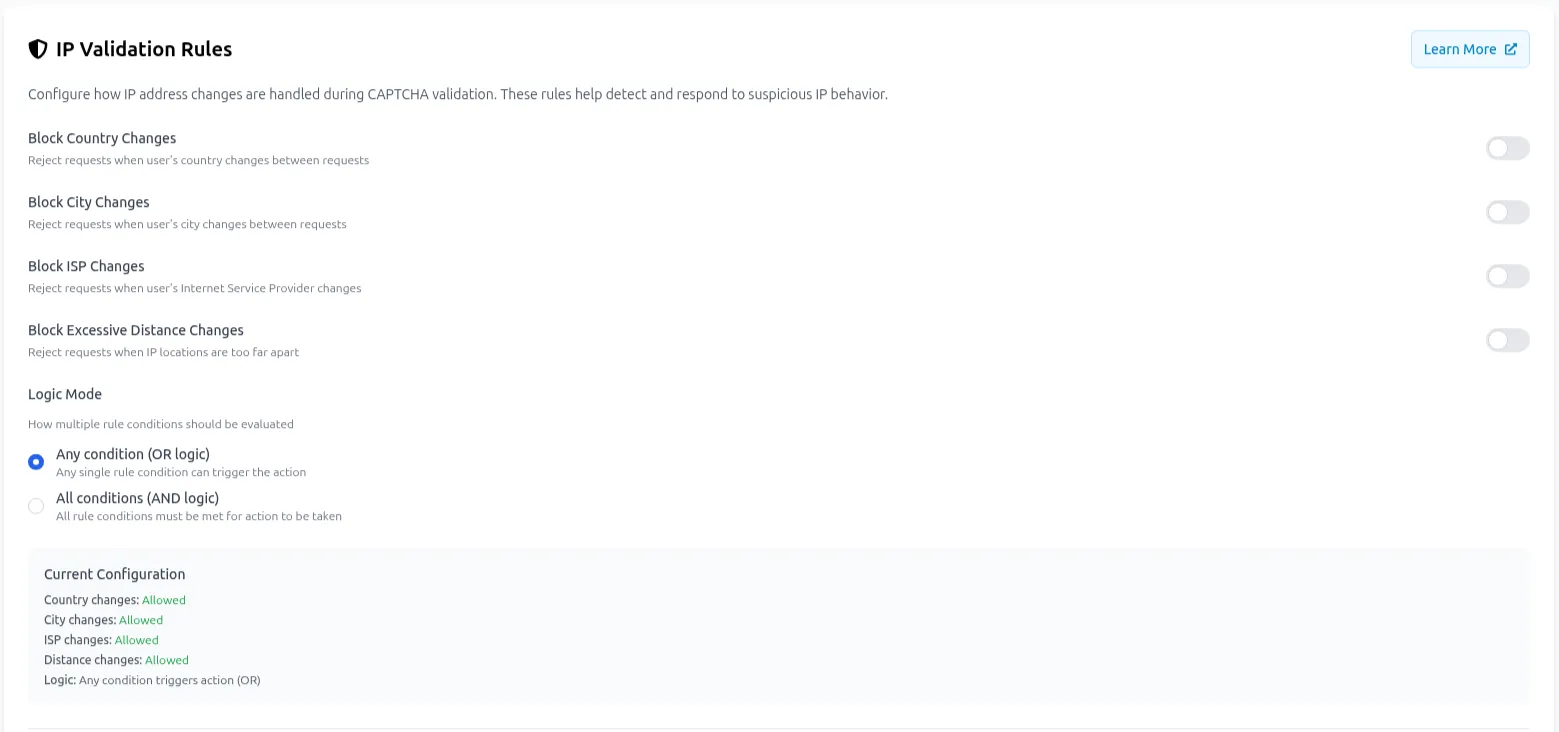
Section titled Configuration via PortalIP Validation rules can be configured through the Prosopo Portal in the Site Settings under the IP Validation tab. The interface provides:
- Toggle switches for each validation type
- Distance threshold configuration
- Logic mode selection (AND/OR)
- Country-specific override management
Default Values
Section titled Default ValuesIf IP validation rules are not configured, the following defaults apply:
- Country Change: Allow
- City Change: Allow
- ISP Change: Allow
- Distance Threshold: 1000km
- Distance Exceed Action: Reject
- Logic Mode: Any condition (OR)
- Force Consistent IP: false
Verification Response
Section titled Verification ResponseWhen IP validation rules are configured and an IP address is provided during verification, the validation results are evaluated according to your rules. If a validation fails and the action is set to “reject”, the verification endpoint will return:
{ "verified": false}The specific reason for rejection is logged server-side but not exposed in the API response for security purposes.
Use Cases
Section titled Use CasesHigh-Security Applications
Section titled High-Security ApplicationsFor applications requiring strict security (banking, healthcare):
{ actions: { countryChangeAction: "reject", cityChangeAction: "reject", ispChangeAction: "reject", distanceExceedAction: "reject", }, distanceThresholdKm: 100, requireAllConditions: false // Any violation blocks}Moderate Security with Monitoring
Section titled Moderate Security with MonitoringFor applications wanting to monitor suspicious activity without blocking legitimate users:
{ actions: { countryChangeAction: "flag", cityChangeAction: "flag", ispChangeAction: "flag", distanceExceedAction: "reject", }, distanceThresholdKm: 1000, requireAllConditions: false}Regional Applications
Section titled Regional ApplicationsFor applications serving specific geographic regions:
{ actions: { countryChangeAction: "reject", // Block country hopping cityChangeAction: "allow", ispChangeAction: "allow", distanceExceedAction: "reject", }, distanceThresholdKm: 500, // Shorter distances expected requireAllConditions: false}Considerations
Section titled ConsiderationsVPN and Proxy Usage
Section titled VPN and Proxy UsageLegitimate users may use VPNs or proxies, which can trigger IP validation rules. Consider:
- Using “flag” actions instead of “reject” for less critical validations
- Configuring country-specific overrides for regions with high VPN usage
- Adjusting distance thresholds to be more permissive
Mobile Users
Section titled Mobile UsersMobile users may legitimately change IP addresses, cities, or ISPs as they move. Consider:
- Using higher distance thresholds
- Allowing city and ISP changes
- Using AND logic (
requireAllConditions: true) to require multiple violations
Testing
Section titled TestingBefore deploying strict IP validation rules:
- Enable rules with “flag” actions to collect data
- Monitor flagged requests to understand legitimate user patterns
- Gradually increase restrictions based on observed behavior
- Test with VPNs and mobile devices to avoid blocking legitimate users
Availability
Section titled AvailabilityIP Validation Rules are available to Professional and Enterprise tier customers. Free tier accounts cannot configure or use IP validation features.
Learn