Verdicts
Esta página aún no está disponible en tu idioma.
Verdicts lists Protect’s decision for each incoming request. Narrow the list by search criteria and date range, and choose Rows per page.
If nothing matches, the page shows No verdicts found. Widen the date range or loosen the criteria.
Protect session
Section titled Protect sessionClick a JTI in the verdicts table to open that Protect session. A session is one visitor’s token: every request they made with it, what Protect decided each time and why. You can also reach it from an audit record whose visit came through Protect.
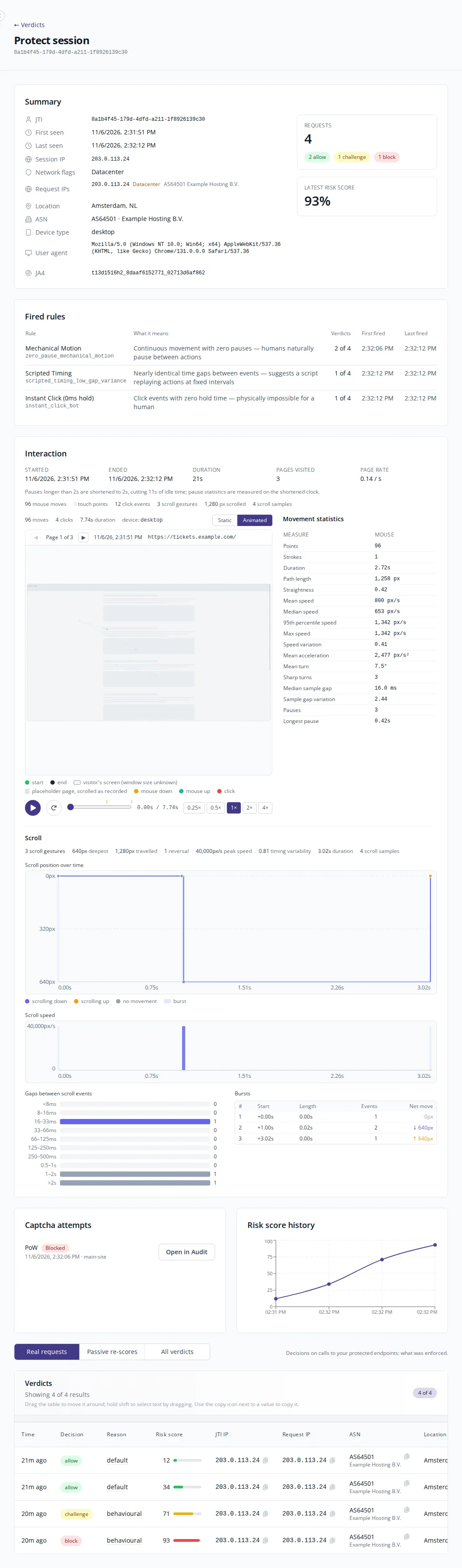
The page is made up of these sections:
- Summary: when the session was first and last seen, the session IP and its network flags (for example datacenter or VPN), the IPs the requests came from, location, ASN, device type, user agent and JA4 fingerprint. It also shows how many requests the session made, broken down by decision, and its latest risk score.
- Fired rules: the detection rules that fired during the session, and on how many of its verdicts.
- Interaction: a replay of the pointer, touch and scroll activity Protect recorded, page by page.
- Captcha attempts: any CAPTCHA served during the session, with its result. Open in Audit opens the matching audit record.
- Risk score history: how the session’s risk score changed from request to request.
- Verdicts: each decision Protect made for the session.
Above the verdicts, choose which decisions to show:
- Real requests: decisions on calls to your protected endpoints. This is what was enforced.
- Passive re-scores: Protect re-scoring the session between requests, showing what it would decide if the visitor asked again. Use this view for a site in passive mode.
- All verdicts: every verdict, including re-scores, telemetry diagnostics and follow-up rule rows.
Some things to look out for:
- Request IPs differs from Session IP: the token was used from more than one address, which can mean it was shared.
- More than one user agent: the token was used by more than one browser.
If part of the session could not be loaded, a notice at the top names what is missing and the rest of the page is still shown.