Email Filter
Questi contenuti non sono ancora disponibili nella tua lingua.
The Email Filter (configured under the Spam Filter in site settings) lets you reject CAPTCHA verifications whose associated email address matches suspicious patterns. It is designed to catch common signup-spam evasion techniques — particularly the Gmail dot and plus-tag tricks — while keeping false positives low.
Email filtering is available to Professional and Enterprise tier customers.
The card is on the Email Filter tab of Site Settings:
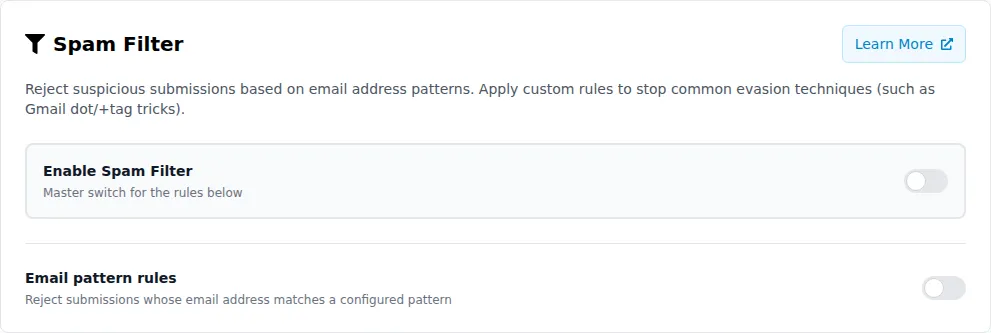
Overview
Section titled OverviewWhen a dapp calls the Prosopo verification endpoint with an optional email field, the email address is evaluated against the configured rules before the CAPTCHA solution is checked. If any rule matches, verification is rejected immediately.
Providing the Email Address
Section titled Providing the Email AddressPass the email in the email field when calling the server-side verification endpoint:
{ "secret": "your_secret_key", "token": "PROCAPTCHA-RESPONSE", "email": "USER_EMAIL_ADDRESS"}If no email is provided, email filter rules are skipped.
Filter Rules
Section titled Filter RulesMaximum Dots in Local Part
Section titled Maximum Dots in Local PartLimits the number of dots allowed in the part of the email address before the @ symbol. For example, with a limit of 2:
[email protected]— allowed (0 dots)[email protected]— allowed (1 dot)[email protected]— allowed (2 dots)[email protected]— blocked (3 dots)
This is effective against the Gmail dot trick, where [email protected] and [email protected] are the same Gmail inbox but appear as different addresses to most systems.
Leave blank to disable the dot limit.
Default Patterns
Section titled Default PatternsA curated set of regex patterns targeting common evasion techniques:
- Many-dots local part: Catches addresses with excessive dots in the local part (more than 3), which are almost always evasion attempts.
- Gmail random plus-tag: Catches addresses like
[email protected]where a random alphanumeric suffix is appended via a plus tag.
Enable with the Apply curated default patterns toggle.
Gmail Address Normalisation
Section titled Gmail Address NormalisationWhen enabled, Gmail and Googlemail addresses are normalised before evaluating custom regex patterns:
- Dots are stripped from the local part (
a.l.i.c.ebecomesalice) - Plus-tag suffixes are removed (
alice+tagbecomesalice) @googlemail.comis rewritten to@gmail.com
This means a single custom regex pattern like ^alice@gmail\.com$ will match all of the following:
Normalisation only affects Gmail/Googlemail addresses. Other domains are evaluated as-is.
Custom Regex Blocklist
Section titled Custom Regex BlocklistAdd your own JavaScript regular expressions to block specific email patterns. Patterns are evaluated case-insensitively against the (optionally normalised) email address.
Examples:
| Pattern | What it catches |
|---|---|
@disposable\.tld$ | Any address at disposable.tld |
^spam@ | Any address starting with spam@ |
@(tempmail|throwaway)\. | Addresses at tempmail.* or throwaway.* domains |
^test[0-9]+@ | Addresses like test123@..., test99@... |
Patterns are validated when saved:
- Maximum 256 characters per pattern
- Maximum 50 patterns per site
- Lookahead, lookbehind, and large quantifiers are rejected to prevent regex-based denial of service
- Invalid regex syntax is rejected at save time
Spam Email Domain List
Section titled Spam Email Domain ListToggle Spam email domain checking (spamEmailDomainCheckEnabled) on to block signups from known disposable and throwaway email providers — tempmail.*, guerrillamail.*, mailinator.* and the thousands of recycled variants spammers cycle through.
The check goes beyond matching the address’s domain directly: Prosopo also follows the domain through any HTTP redirect, CNAME alias and MX record, so newly-registered throwaway domains can’t bypass the list by simply pointing at a known disposable backend.
The blocklist is maintained and refreshed for you — there’s nothing to configure beyond the toggle. Rejected requests come back with status API.SPAM_EMAIL_DOMAIN.
Standalone Endpoint
Section titled Standalone EndpointYou can also check an address without running a full CAPTCHA verification:
POST /v1/prosopo/provider/client/spam/emailContent-Type: application/json
{ "dapp": "YOUR_SITE_KEY"}{ "isSpam": true, "emailDomain": "example.com"}Available to sites with the domain check enabled, and rate-limited per site key.
Evaluation Order
Section titled Evaluation OrderWhen the email filter is enabled and an email is provided, the verification endpoint evaluates the email in this order:
- Email validity — malformed addresses are rejected immediately.
- Maximum dots — if configured, checked first.
- Default patterns — if enabled, evaluated next.
- Custom regex blocklist — each pattern is tested in order; first match wins.
- Spam-email-domain list — if enabled, the domain (and any redirect, CNAME or MX it points at) is checked against the maintained blocklist.
Evaluation stops at the first match. The rejection reason is recorded for audit purposes.
Configuration via Portal
Section titled Configuration via PortalEmail filter rules are configured in the Prosopo Portal under Site Settings > Email Filter:
- Enable Spam Filter — master toggle for all email rules
- Email pattern rules — sub-toggle to activate pattern matching
- Maximum dots in the local part — numeric input
- Apply curated default patterns — toggle
- Normalise Gmail addresses before matching — toggle
- Custom regex blocklist — add/remove patterns with validation
All changes are saved together via the Save All Changes button.
Verification Response
Section titled Verification ResponseWhen an email rule blocks a request, the verification endpoint returns:
{ "verified": false, "status": "API.SPAM_EMAIL_RULE"}Possible status codes:
| Status | Meaning |
|---|---|
API.SPAM_EMAIL_RULE | Email matched a custom regex pattern |
API.SPAM_EMAIL_DOMAIN | Email domain is on the known-spam list |
Use Cases
Section titled Use CasesStopping Gmail Dot/Plus-Tag Abuse
Section titled Stopping Gmail Dot/Plus-Tag AbuseA single Gmail account can generate thousands of apparent email addresses using dots and plus tags. To block this:
- Enable Email pattern rules
- Enable Apply curated default patterns (catches random plus-tags and excessive dots automatically)
- Set Maximum dots to
2 - Enable Normalise Gmail addresses if you also use custom patterns
Blocking Disposable Email Domains
Section titled Blocking Disposable Email DomainsTo block known throwaway email services:
- Enable Spam email domain checking (uses the maintained domain list)
- Optionally add custom patterns for domains not yet on the list:
@(tempmail|throwaway|guerrillamail)\.
Organisation-Specific Patterns
Section titled Organisation-Specific PatternsIf you see abuse from specific patterns unique to your service:
- Add targeted custom regex patterns
- Monitor the
API.SPAM_EMAIL_RULEstatus in your verification responses - Adjust patterns based on what you observe
Availability
Section titled Availability| Tier | Email Filter |
|---|---|
| Free | Not available |
| Professional | Full access |
| Enterprise | Full access |